Synthesize as You Go
When you continuously interview customers, there’s no clear point at which to stop and synthesize what you are learning. Instead, you’ll need to synthesize as you go. Meet the interview snapshot.
An interview snapshot is a one-pager designed to help you synthesize what you learned in a single interview. It’s how you are going to turn your copious notes into actionable insights. Your collection of snapshots will act as a reference or index to the customer knowledge bank you are building through continuous interviewing.
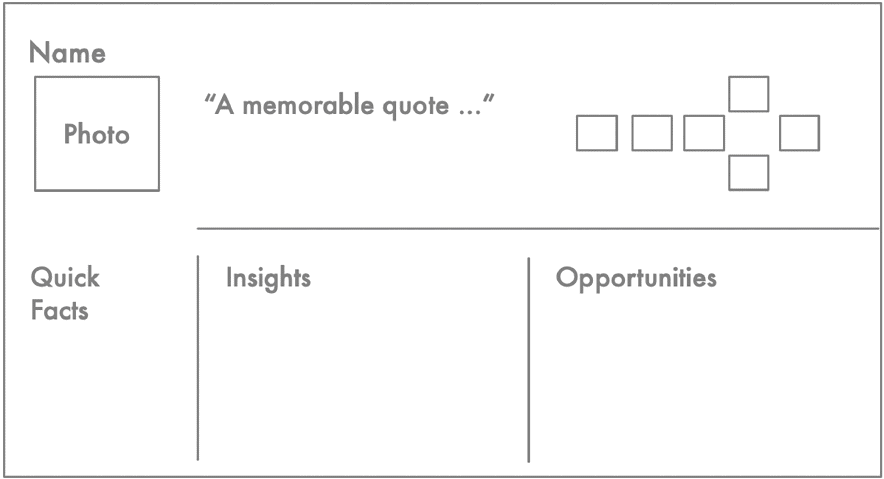
After you’ve conducted even a handful of interviews, let alone the dozens you will conduct each year, interviews will start to blur together. You don’t want to rely on your memory to keep your research straight. That’s the job of an interview snapshot. Snapshots are designed to help you remember specific stories. They help you identify opportunities and insights from each and every interview.
The cliché “A picture is worth a thousand words” is true. The more visual your snapshot, the easier it will be for the team to remember the stories you collected—even weeks or months later. With permission, include a photo of the participant. Grab one from a social-media profile. Grab a screenshot from a video call. Snap a photo during an in-person interview. If your corporate guidelines require that you anonymize your interview data, or if you are interviewing participants about sensitive topics, skip the photo, and replace it with a visual that will help you remember their specific story. This could be a workplace logo, the car they drive, or even a cat meme that represents their story. The photo should help you put that interview snapshot into context. It should help you remember the stories that you heard.
At the top of the snapshot, include a quote that represents a memorable moment from their story. This might be an emotional quote or a distinct behavior that stood out. Like the photo, the quote acts as a key for unlocking your memory of the specific stories that they told. I can still remember memorable quotes from interviews that I did years ago. A couple of my favorites are “I’ve worked here for three years. But they feel like dog years.” And “I’m old school. Agile doesn’t work for me.” When a participant uses vivid language, be sure to capture their exact words.
To help put a specific interview into context, you’ll want to capture some quick facts about the customer. The quick facts will change from company to company, but they should help you identify what type of customer you were talking to. For example, a service that matches job candidates with companies might segment their employer customers by size (e.g., SMB, enterprise) or they might list average annual contract size. A streaming-entertainment service might list the customer’s sign-up date and average hours watched each week. If they segment further, they might even include behavioral traits like binge-watcher or active referrer. The goal of the quick-facts section is to help you understand how the stories you heard in this interview may be similar to or different from those you heard from other customers.
The photo and the memorable quote will act as keys that help you to unlock your memory of the stories you heard. The quick facts help you situate those stories in the right context. Now you want to capture the heart of what you learned. You’ll do this by identifying the insights and opportunities that you heard in the interview.
An opportunity represents a need, a pain point, or a desire that was expressed during the interview. Be sure to represent opportunities as needs and not solutions. If the participant requests a specific feature or solution, ask about why they need that, and capture the opportunity (rather than the solution). A good way to do this is to ask, “If you had that feature, what would that do for you?” For example, if an interviewee says, “I wish I could just say the name of the movie I’m searching for,” that’s a feature request. If you ask, “What would that do for you?” they might respond, “I don’t want to have to type out a long movie title.” That’s the underlying need. The benefit of capturing the need and not just the solution is that the need opens up more of the solution space. We could add voice search to address this need, but we also could auto-complete movie titles as they type.
Opportunities don’t need to be exact quotes, but you should frame them using your customer’s words. This will help ensure that you are capturing the opportunity from your customer’s perspective and not from your company’s perspective.
Throughout the interview, you might hear interesting insights that don’t represent needs, pain points, or desires. Perhaps the participant shares some unique behavior that you want to capture, but you aren’t sure yet what to do with this information. Capture these insights on your interview snapshot. Over time, insights often turn into opportunities.
The goal with the snapshot is to capture as much of what you heard in each interview as possible. It’s easy to discount a behavior as unique to a particular participant, but you should still capture what you heard on the interview snapshot. Be as thorough as possible. You’ll be surprised how often an opportunity that seems unique to one customer becomes a common pattern heard in several interviews.